 Abdur Razzak
ChatGPT remains one of the most searched AI assistants in 2026, but knowing how to use it well matters more than simply opening a chat and typing a question. It can help with research, writing, learning, planning, coding, file analysis, and creative work. Features such as web search, Memory, and Projects can also make it more useful for ongoing tasks when they are available in your account.
This practical guide explains what ChatGPT is useful for in 2026, how its main features fit together, how to get better answers, and where you still need to verify information. It also addresses a concern raised by users in recent online discussions: why a long conversation may lose track of earlier context, and how to organise work more reliably.
Why ChatGPT Is a Major AI Search Topic in 2026
In a Google Trends comparison covering 21 October–21 November 2026, ChatGPT recorded an average relative search-interest score of 83.39 in the United States on a shared 0–100 scale. Google Gemini scored 7.61 and Claude AI scored 5.03 in the same comparison. A separate global search-interest tracker reported that ChatGPT led the tracked AI-tool searches in 88 of 89 countries as of 15 November 2026.

These figures describe search interest, not active users, product quality, or total search counts. The Google Trends comparison is US-only, covers one month, and compares eight selected AI tools on a shared scale, so it is evidence of relative interest within that specific set—not a ranking of every AI-related search topic.
The same report lists related ChatGPT searches such as “chatgpt login,” “chatgpt free,” “chatgpt app,” and “chatgpt business.” These queries suggest a mixed search intent: readers want to access ChatGPT, understand free access, find the app, and evaluate business use—not only learn what the product is.
Reddit discussions add another useful angle. In November 2026, users described problems with memory, long conversations, and context-window limits. These posts are individual experiences rather than a representative survey, but they highlight a common practical question: how can people keep important project context organised without expecting one chat to remember everything?
What Is ChatGPT?
ChatGPT is an AI assistant that can respond to natural-language instructions and help with a wide range of tasks. Depending on the plan, model, tools, and settings available to an account, it may work with text, images, files, voice, web search, and other supported inputs or outputs.
It is best understood as an assistant for drafting, exploring, analysing, and organising information—not as an infallible source of truth. It can produce useful explanations and first drafts, but it can also misunderstand a request, overlook context, or state incorrect information confidently. The user remains responsible for checking important claims and decisions.
What Can You Use ChatGPT For in 2026?
1. Research and learning
Ask ChatGPT to explain an unfamiliar subject, compare concepts, build a study outline, or help you understand a document. For current or specialised topics, use web search where available and inspect the cited sources instead of relying only on the generated summary.
2. Writing and content planning
ChatGPT can help create outlines, draft articles, rewrite passages, brainstorm headlines, prepare social posts, and check clarity. Give it the audience, purpose, tone, target length, and source material. Review factual statements, originality, citations, and brand requirements before publishing.
3. Working with files and data
Where file analysis is supported, you can upload documents or spreadsheets and ask for summaries, comparisons, calculations, or structured findings. Tell ChatGPT which file is authoritative, which fields matter, and what format you expect. Verify calculations and important extracted values against the original file.
4. Coding and technical problem-solving
Use ChatGPT to understand code, explore an error, generate a small example, or plan a debugging process. Share the relevant code, error message, environment, and expected behaviour. Test generated code in a safe environment and review dependencies, permissions, and security implications.
5. Planning and productivity
ChatGPT can help organise a project, turn a broad goal into tasks, prepare meeting notes, develop checklists, or compare options. For a recurring or long-running project, keep key decisions and source files in a structured workspace rather than depending on a single very long chat.
Important ChatGPT Features to Understand
Web Search
ChatGPT can search the web when current information is needed. Search results may include citations that let you open the underlying sources. Use this for recent developments, product details, schedules, policies, and other facts that can change. Check the publication date and the original source, especially when an answer could affect a financial, legal, health, or business decision.
Memory and Personalisation
When Memory is enabled, ChatGPT may use relevant information from available sources to personalise later responses. Memory does not retain every detail from every conversation, and the available controls can vary by plan, region, platform, and workspace settings.
Use Memory for helpful preferences and stable context, not as the only storage location for critical project requirements. For exact facts, deadlines, specifications, or decisions, keep a reliable source document and provide it when needed. You can review the Memory controls available to your account under Settings and Personalisation.
Projects
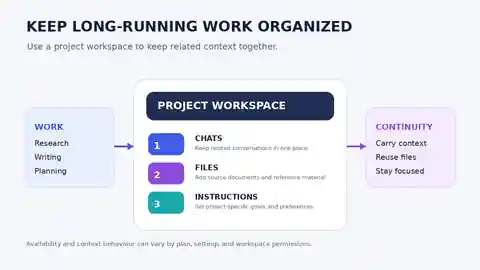
Projects help keep related chats, files, and project-specific instructions together. They are useful for ongoing work such as research, content production, study, or planning. Add the reference documents and instructions that matter, and keep project information current so the assistant has a clearer working context.
Projects can improve continuity, but they should not be treated as an unlimited or perfectly accurate memory. Review the material in the project and restate critical constraints when a task requires precision.
Voice, Images, and Other Tools
Depending on account availability, ChatGPT may support voice conversations, image creation or understanding, and other tools. These can make some tasks easier—for example, discussing an idea aloud, interpreting an image, or creating a visual concept. Availability and usage limits vary, so check the tools shown in your own account.
How to Get Better Results from ChatGPT
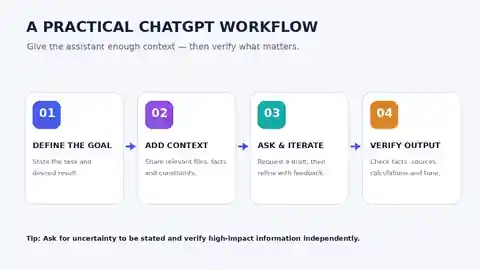
The quality of an answer often depends on the quality of the instructions and the context you provide. A useful prompt does not need to be complicated, but it should make the task clear.
- State the goal: Explain what you want ChatGPT to produce or solve.
- Describe the audience: Say who will use or read the result.
- Provide context: Include relevant facts, examples, files, and constraints.
- Specify the output: Request a table, checklist, outline, email, code sample, or article as appropriate.
- Set boundaries: Identify what must not be changed, assumed, or invented.
- Ask for uncertainty: Tell ChatGPT to identify missing information and distinguish verified facts from assumptions.
- Review and refine: Check the response and give specific feedback for the next version.
Example prompt: “Create a 1,200-word beginner guide for small-business owners. Use the attached product documentation as the primary source, include a practical checklist, avoid unsupported statistics, and list any details that need verification before publication.”
Why ChatGPT May Lose Context in Long Conversations
Some Reddit users have recently reported that ChatGPT did not consistently retain earlier details in long conversations or that they encountered context-window messages. These are user-reported experiences, not proof that every account has the same issue.
There are several reasons a response may not reflect everything said earlier. A conversation can exceed the amount of context available to the active model; Memory does not save every detail; a new chat may not contain all the working material from an earlier one; and account or workspace settings can affect which information is available.
To reduce confusion:
- Use a Project for work that spans multiple conversations.
- Keep a concise project brief with goals, decisions, terminology, and open questions.
- Upload or link the current source document instead of relying on a remembered summary.
- Ask ChatGPT to list the assumptions and source files it is using before a high-impact task.
- Correct outdated information when requirements change.
This approach makes work easier to continue and gives you a way to check whether the assistant is using the right context.
ChatGPT Limitations You Should Know
- Incorrect answers: ChatGPT can make mistakes or produce plausible but unsupported statements. Verify important facts.
- Changing features: Models, tools, plans, and usage limits can change. Check current account details and official announcements.
- Incomplete context: Memory and chat history do not guarantee that every relevant detail will be available.
- Source quality: Web search can surface weak or outdated sources. Open and evaluate citations yourself.
- Privacy: Do not paste passwords, private keys, sensitive customer data, or confidential information unless you are authorised and understand the applicable data controls.
- Human judgement: Generated advice should not replace qualified professional review for high-stakes decisions.
ChatGPT Free vs Paid Plans: What Should You Consider?
ChatGPT offers different plan types and levels of access, but exact prices, model availability, message limits, and tool allowances can change and may vary by country or account. Rather than relying on an old price list, compare the plan details shown in your account or on the official pricing page before subscribing.
When comparing plans, consider:
| Factor | What to check |
|---|---|
| Usage limits | How often you can use the models and tools you need. |
| Model access | Which models and reasoning options are included. |
| Tools | Whether web search, file analysis, image generation, voice, and other tools fit your workflow. |
| Context and projects | Whether the available context, memory, and project features meet your needs. |
| Privacy and administration | Data controls, workspace management, and business requirements. |
Start with the lowest plan that meets your actual needs. Upgrade only when a specific limit or feature is affecting your work often enough to justify the cost.
Frequently Asked Questions About ChatGPT
Is ChatGPT free to use in 2026?
A free ChatGPT plan is available, but it has usage and feature limits. Paid plans provide different levels of access. Check the current plan comparison for availability in your region.
Can ChatGPT search the internet?
Yes. Web search is available in supported ChatGPT experiences and can provide citations. Search availability and usage limits depend on the account and workspace settings.
Does ChatGPT remember previous conversations?
When Memory or relevant personalisation features are enabled, ChatGPT may use selected information from past chats and other available sources. It does not remember every detail, so keep important project information in a reliable document or Project.
What are ChatGPT Projects used for?
Projects keep related conversations, files, and instructions together. They are useful for ongoing work that needs shared context, such as writing, research, planning, and study.
Can ChatGPT analyse PDFs and spreadsheets?
File upload and analysis are available in supported experiences, with limits that depend on the plan and file type. Verify extracted data, formulas, and conclusions against the original files.
Can I rely on ChatGPT for accurate information?
Use it as an assistant, not as the final authority. Check current facts against credible sources, test calculations and code, and seek qualified review for high-impact decisions.
Final Thoughts: Use ChatGPT as a Helpful Assistant, Not an Automatic Authority
ChatGPT remains a leading AI assistant in search interest in 2026, while alternatives such as Gemini and Claude are also attracting attention. Its value comes from how well you combine the assistant with clear instructions, relevant source material, web search, and a sensible review process.
For quick tasks, a normal chat may be enough. For research or current information, inspect the sources. For longer projects, organise chats, files, and instructions in a Project and keep a concise record of important decisions. Above all, check the output before you act on it or publish it.
Sources and Further Reading
- AI tools search interest in the US, 21 October–21 November 2026 — Google Trends comparison of selected AI tools on a shared scale.
- Reddit: Context Window Full reports — user discussion from November 7, 2026.
- Reddit: ChatGPT not remembering — user discussion from November 3, 2026.
- OpenAI Help Center: What is ChatGPT? — official product overview and available features.
- OpenAI Help Center: Memory in ChatGPT — how Memory works and how to manage settings.
- OpenAI Help Center: Projects in ChatGPT — organising chats, files, and project instructions.
- OpenAI Help Center: Searching the web with ChatGPT — web search availability and citations.
Editorial note: Trend figures are relative search-interest measurements from third-party reports, not search counts or proof of product usage. Features and plan limits can change; consult official OpenAI documentation for current availability.